Category Archives: tECHNOLOGY

how does the 220 volt 208 volt thing work?


This is a good intro


From:


https://www.physicsforums.com/threads/how-does-120-240-and-440-circuits-work.128535/


Jan 23, 2011 #11 flhampton 1 This might help everyone understand 120/240/440 volt circuits a little bit better. I have a degree in electronic engineering degree from Arizona State University. This doesn’t make me any smarter, but it does allow me to understand how electricity works. They taught us about single phase and three phase transformers in school, but I didn’t really understand things until I started my own consulting business and had to find out how things work for myself. It’s really quite simple. The power company generates 3-phase electricity (3 separate voltage Outputs) from a generator. It is called 3-phase because each output has the same voltage and current capability but it is 120 degrees out of phase with the other two outputs. If you were to look at all three outputs on a scope, you would see three distinct sinusoidal waveforms. Since the generator is operating at 60Hz (60 cycles per second), one complete sinusoidal wave would be output in 1/60th of a second. If you were able to set your scope to 60Hz/division (1/60th of a second), then you would see three separate wave forms per division, each of the three wave forms would be 120 degrees out of phase or 1/3d of a waveform from peak to peak of each wave. It really doesn’t matter what voltage the power company puts out, because they immediately use a 3-phase step up transformer to increase the voltage to 110,000 volts or more. The higher the voltage, the lower the current flow needed for power consumption. Lower current flow means smaller gage wire and less power loss in the lines due to resistance. What is important is that it be at exactly 60Hz, in order to synchronize with all other generators on the transmission grid. Before it gets to you, the home consumer, it is stepped down several times in substation transformers. That transform you see on the pole by your home is stepping down 16KV or 4KV to 120 volts not 240V as most people would believe. There is one primary coil and two secondary coils wrapped around the core of the transformer. The two secondary coils are tied together in the middle, but one of them is wound in the opposite direction. This means that both coils will produce 120 volts but that voltage output between the two of them will always be 180 degrees out of phase. If you measured the output between the two secondary transformers on a scope, you would actually see a 60Hz sinusoidal wave with a crest/peak at +170 volts and trough at -170 volts. That is because the peak voltage of a 60Hz sinusoidal wave is 1.41x the RMS voltage of 120 volts. You are not measuring RMS voltage on the scope you are measuring actual voltage from peak to peak. The center of the two secondary coils is tied to earth ground. It is the same earth ground that you are required to have at your home. If you look inside your main electric service panel, you will usually see two black wires and one white wire coming from the output of your meter. The Black wires come from each side of the two secondary windings of the transformer for your home. The white wire is actually connected to the grounded center wire coming from your transformer. This white wire is called neutral inside your home because it always has a voltage of zero with respect to the two black wires. It is always connected to the ground wire inside your service panel via the common ground/neutral bus. So earth ground and neutral are basically the same wire, but they serve two purposes. Neutral is only used for 120 volt circuits. If you think of electricity in terms of the current flow, then it is the return path for this current. It is returned to the center of the two, oppositely wound, 120 volt, secondary transformers windings. This simply means that 120 volt current flows from one black wire (hot) to neutral. The ground wire is there to protect you in case of a short to the chassis of the equipment in use. If the hot (black wire) inadvertently shorted to a metallic chassis, then it would cause a circuit overload and trip the breaker. If the chassis wasn’t tied to ground then you might get electrocuted when you picked up the equipment. Under the right conditions, your body can conduct electric current from the shorted chassis of that device through you to ground. Your body is not a pure conductor. It has resistance to that flow of current, just like a light bulb has resistance. A light bulb glows and the breaker doesn’t trip because the resistance of the light bulb limits the amount of current flow. Your body can do the same thing. It is possible for you to turn into a light bulb and the circuit breaker will not trip. Basically you fry to a crisp and die. That may seem like overkill, but that is what ground protection is intended for. Your service panel actually has a separate isolated 120volt buss for each of the two hot wires coming in from the transformer. The two busses have several legs. Each leg lies between the legs of the other bus. This means that the voltage between any two legs that are beside each other will always be 240V (RMS) 240 volt current flows between the two legs of the two separate busses. It is not returned to neutral. That is why 240V breakers are usually twice the size of 120Vbreakers. They must connect to two legs, one on each side of the buss. Older 240 volt appliances have a three wire plug. Two of those wires are hot. They come from each branch of the opposing 120V busses. The ground wire is only there for safety purposes should there be a short to the chassis of the appliance. Newer 240 volt appliances have a four wire plug. Two hot wires, one neutral, and one ground. The neutral is there because many 240 volt appliances also use 120 volt sources such as light bulbs, digital displays, etc. You don’t really need the neutral wire because the appliance would still work using ground as a return path for neutral. Remember, neutral and ground are really the same wire. They simply serve two different purposes. So what about 208V systems. You only find 208V wiring in commercial/industrial settings, where three phase wiring is being used. There are two types of 3-phase transformer configuration; delta (as in a triangle), and “Y” (as in the letter). This represents how the different windings of the transformers are connected together. I’m not going to go into transformer theory here. You will have to read about that separately, but I will sum it up. The output voltage across any single phase of a 3-phase delta step-down transformer is 240V or 480V depending on the needs of the end user. 480V would simply be stepped down two 240 as described earlier. Neutral and ground are tied together at the service panel. It only requires three wires to be run to the point of service. Each phase of the transformer can be used for a home. That means that one transformer can provide 120/240 volt service to three different locations. The step-down transformer for your house is set up in a delta configuration because that is what makes it possible to get both 120 and 240 volts out of any one phase or any two wires connected across the transformer. If you needed 3-phase wiring at your home then the power company would have to put in a special transformer just for you at a very high cost, because each of the three legs of their transmission line are undoubtedly already being used in single phase 120/240 delta transformer configurations. Y- Transformer configurations are used in commercial/industrial settings because one transformer can service several clients. That means it is cheaper for the utility company. The output across any two phases of a 3-phase-Y transformer is 208V. One leg of each coil in the transformer is tied together like a “Y”. The voltage across any leg to this common center point is 120V. This is quite convenient, because in the US, every commercial/industrial 3-phase user still needs 120V service. The power company is able to kill two birds with one stone. The end user gets 3-phase, 208V electric service and 120V single phase service for normal appliance use. All 240Volt single phase devices are designed to work using 208V in the US. So if you have a 240V single phase A/C unit or motor, it will work just fine using 208V. It will simply use more current at that voltage. 3-phase motors and A/C units are much cheaper to design. They also require less maintenance and can do more work. They last longer. That’s why commercial/industrial areas use 3-phase electricity. I’m sure most commercial/industrial users would prefer to have 3-phase 240V delta power if they could. But they don’t want to pay for additional transformers to be installed. It would take a long time to recoup the money. This only occurs when extremely large amounts of power are required or when a company purchases a large amount of land, then develops it themselves. The average commercial storefront user is stuck with 208V because of the lower capital equipment cost required when power is initially brought in to an area.

Reference https://www.physicsforums.com/threads/how-does-120-240-and-440-circuits-work.128535/

What are the details for the 2015 electronics and Robotics class?

 2015 class is done and gone!

9.00 to 12.00 AM Electronics Class


20150707_113137

Monday:

Page 2-7

introduction to relay

Tuesday

Page 7 current

relay details

CHALLENGE:

Slow Fan /Fast fan  with ann

IMG_1123

1.00 to 4.00 PM Robotics Class

IMG_1124


20150707_144024

http://youtu.be/mUDV5nQBOLY

IMG_1131

Goal: construct and program a robot.  the robot will be controlled via a Android Cell phone.

The final test will be a robot soccer tournament, with each student competing on teams for the championship.

the coaster Chassis will be the same as last year.

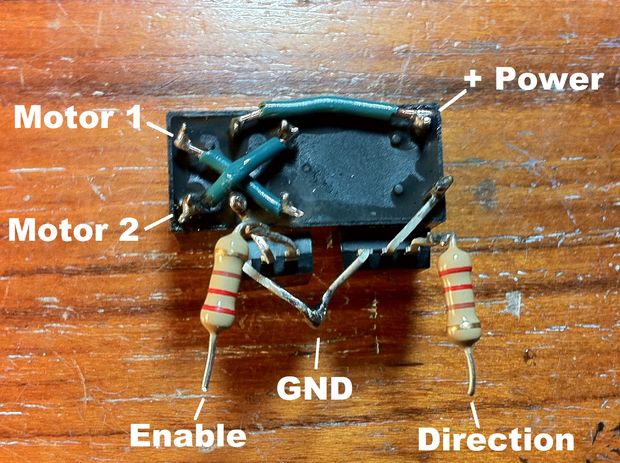
4WD_RobotBaseThe  Controller   is an Arduino .  The drive logic board will be hand made with relays as per this Instructible. EasyRelay

here is the actual relays we used

20150710_065700

The Bluetooth link will be provided by this (ubiquitous) HC05 module:

HC06 Module

The header strips will be used to connect the loose wires to the arduino

first run at the arduino code and the Android code will  be from TechBitar. This Cel Phone App, and Arduino code is a simple interface that

Control 2 DC Motors Via Bluetooth (1)

Which pin is which?


BOM

4WD motor base

..1 ea battery holder (included)

..4 ea AA battery

Arduino

.. 1 ea 9V battery

..1 ea 2.1mm plug  w wires

Header strips for arduino connection


HC05

..1 ea cable (included)

..1 ea 1000 ohm resistor

.. 1 ea 2000 ohm resistor

Relay H Bridge

..2 ea relay

..2 ea tip-120

..2 ea 220 ohm resistor

Tywraps

Hotglue

Tape


Tools:

Power supply

strippers


Other surfing:

these prototype backpacks are a little cheaper,  Amazon Offering,

Two Wheel, 2 deck:

US Based in Vermont:

http://yourduino.com/sunshop2/index.php?=product_detail&p=223

Other Chassis : http://www.mhobbies.com/dagu-magic-car-4wd-robot-chassis-with-4-tt-motor.html 28.00

Simpler 2 wheen chassis in stock http://yourduino.com/sunshop2/index.php?l=product_detail&p=406

Motor controller

http://www.allelectronics.com/make-a-store/item/md-57/motor-driver-1a-dual-tb6612fng/1.html

How do I configure a New Ubuntu Machine with all the usual suspects?

General Rules for aquiring hardware for linux MINT:

1. Don’t buy bleeding edge new stuff, but hardware that’s already on the market for some time. That increases the chance of the right drivers being present in the kernel of Mint 18. Additional advantage: it saves you a lot of money.

2. Make sure your graphics card is either Intel or Nvidia; avoid AMD and the others.

3. Wireless: Buy Atheros, Intel, Ralink or Realtek instead.don’t buy a Broadcom chipset.

https://help.ubuntu.com/community/GoogleEarth

http://ubuntuguide.net/how-to-install-google-earth-in-ubuntu-10-10-maverick

http://www.liberiangeek.net/2010/09/install-citrix-ica-client-ubuntu-10-10-maverick-meerkat/

D)

http://www.skype.com/intl/en/get-skype/on-your-computer/linux/post-download/

http://www.citrix.com/English/ss/downloads/details.asp?downloadId=3323&productId=186&c1=sot2755&c2=pov163070&c3=ost1349860#top use the .DEB

http://support-asia.canon-asia.com/contents/ASIA/EN/0100236502.html canon printer

GIMP from Repository

XP DualBoot BlahBlah

LabJack installs .Net framework

Robot Lawn Mower

Steve Goode and I are building up a hardware-minimal robotic lawn mower.  Sort of an attempt to recapture the Lawn-Mower-On-A-String of yor, with no string.

This is a dumping ground for development information, not a tutorial.  Use at your own risk.

1. Current Videos
2. Current Issues
3. Initial Setup
4. configuration files
5. NO RC Arm
6. Mower original information
7. PIXHAWK user manual
8. Log files to user group
9. Ardusimple RTK, Pointperfect


1. Current Videos


Mower misses bout 1 of every 3 passes

“Hardware Minimal” because it uses a 21inch push mower, stock front wheel drive, single steerable tailwheel.


We are using  Pixhawk 4 as the autopilot:

2. Current Issues
  1. No Data LinkNo data link. We use USB currently to connect MISSION PLANNER to PIXHAWK running ARDUROVER.  This gives us configuration, start/stop, mode, and telemetery.here are the Old Notes-ESP8266 config for Mission Planner. I never could master this, so we bought a preconfigures 8266 from  mRobotics.  Perfect.

2. Cannot arm the no Rc. –  solved, mostly –  see note 2 at bottom

3. robot always drives away from desired course – solved, reversed servo channel 1

4.  robot shows armed, but always circles left – solved, servo arm broken.

5. robot weaves back and fort across desired track – FF tuning, – solved, L1NAV tuning.

6.

No data link. We use USB currently to connect MISSION PLANNER to PIXHAWK running ARDUROVER.  This gives us configuration, start/stop, mode, and telemetery.

here are the Old Notes-ESP8266 config for Mission Planner. I never could master this, so we bought a preconfigures 8255 from  mRobotics.  Perfect.

7. mower cannot “panic stop” – add relay to ignition shutoff

8. mower does not turn aggressively toward the desired track, slight swerve. –  CURRENT TROUBLESHOOTING:

A.  here is the check for max turn rate On Mission Planner’s Flight Data screen, check the “Tuning” checkbox (bottom middle), double click on the graph and select “gz” (Gyro Z-axis)
Drive the vehicle in Manual mode at a medium speed making very sharp turns
Set ACRO_TURN_RATE to a bit lower than the highest values seen. Note the value shown may be in centi-degrees/sec so its value should be divided by 100 to match the parameter’s deg/sec

b.   https://ardupilot.org/rover/docs/rover-tuning-steering-rate.html

c.  this puts the GCS TUNING permeters to PID on tuning screen

Set the GCS_PID_MASK to 1 (Steering)

d. on TUNING, select PID DESIRED, PID ACHIEVED.


E.

another summary of tuning in nav https://github.com/ArduPilot/ardupilot/issues/6565

Tuning turn rate

https://ardupilot.org/rover/docs/rover-tuning-steering-rate.html

__________________________________________________________


5 part intro to pixhawk_APM  setup

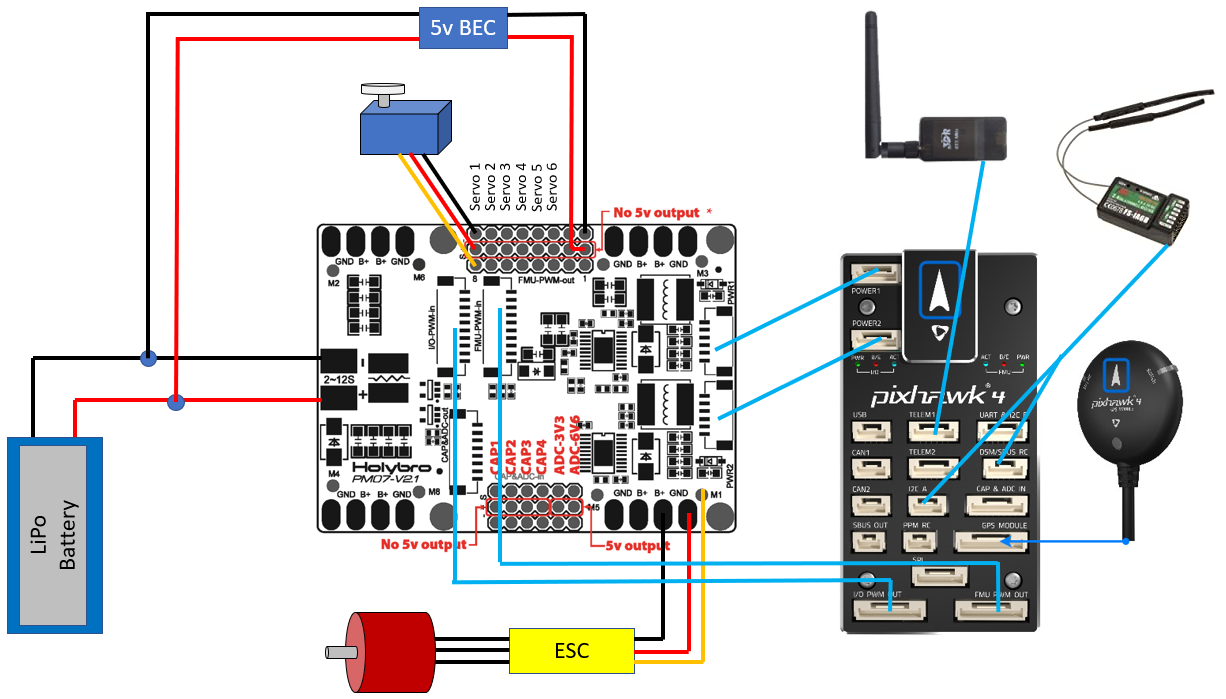
PM07 INITIAL SETUP
ana volt and curr
Holybro pixh 4 pm
Cube or pixhawk
Volt devider calc 18.182
Curr
Amps per volt 36.364

Note 2 – Arm  with no rc –

This Arm with no RC turned out to be such a pain that we installed a RC reciver and used that for manual steering.  Much easier

RC receiver in use  FS-X6B

20160924022953FS-X6B Receiver User Manual


Old parmeter list
Params1OLD

another old peram file
Params1OLD

Grass Sensor PC board:
Pin 1. Sensor 1 LED signal from ESP
Pin 2. DATA
Pin 3 DATA
Pin 4 POWER
Pin 5. GND
Pin 6.
Pin 7.
Pin 8. Reserved sensor 2.
Pin 9. SENSOR1 Signal to arduino, GND = no grass.
Wiskers PCB


MS Plug sample mumbers
Ms3126e12-10s
Ms3114e12-10p
Ms3126e14-s
Ms3114e14p

Spring 2022, spiral path via LUA script

Try native spiral in MP

In 1.3.74

(after you’ve got a polygon) – AutoWaypoints – Survey(grid) – Check “Advanced Options” in the display menu – Grid Options tab – Spiral.

Edit: Here’s a screen shot to make sure we’re talking about the same thing.

========================

Mower steering loads will blow up a servo if the wheel resists the servo command:


Alternative servo for the future:
Wingzine Servo boards
https://deepsouthrobotics.com/2019/08/23/anatomy-of-a-huge-self-driving-mower/

Notes on tuning configuration:

Acro turn rate, to the right 16s per 360,  22.5 deg/s

Navl1_damp.           .85 try .75 again

Navl1_period.        15

Navl1_xtrack_i.       .03

Steer P.                         1.      Try 0

Steer I.                            .4.      Try 0

Steer p.                         0

Imax.                                 1

FF.                                     2.2.  .6 was way too low

Turn radius.               .2


Config, 45 to 25.

Ff from .7 to 2.0. Improved turns. 2.5 is a little nervous. 2.2 best

Tires slip, belt slips


More on throttle tune

https://ardupilot.org/plane/docs/reverse-thrust-setup.html

https://www.instructables.com/Retreading-Your-Lawn-Mower-Tires/

6. Original mower information

The drive transmission conked out halfway through development.  Quick to overhaul.


8. Log files to user group


TLDR: Noobe needs assistance tuning parameters on robot mower. Logs attached

All.

Thanks in advance for the help.  We are building up a “hardware minimal” robot lawn mower.  21 inch self propel with a single steerable tail wheel.  Stock front drive wheels, with rear wheels removed.  Tailwheel steering via a less than perfect linkage to a heavy hobby servo.  The platform has exceeded my expectations, but I am stumped on the final tuning.   I would like smoother straight line steering.


Electronics are Pixhawk4, MP, stock PIXHAWK hockey puck GPS.  HDG 1 and 2 set turned off, because it looks terrible on screen.  Wild 45 degree HDG changes, even though the hockey puck is  on a 30 inch mast.

It tracks a while with small, 6 inch deviations.  Then occasionally takes a 20 degree steering lurch  for a 30 inch deviation.

Biggest improvements have centered the PID DESIRED vs PID ACHIEVED tuning, leading to increasing FF toward 2.9.  PID numbers adjustment  seem to be useless


9. Ardusimple RTK, Pointperfect


RTK Improvement:  https://mowerproject.com/category/rtk-gps/

tl;dr try Obviously we appear to be looking at a mask of 13-15 degrees elevation. 40 S/N

Thingstream domain
FairviewRover:
Password : FairviewRover#1
https://portal.thingstream.io/app/location-services
try this for a log in string FairviewRover:FairviewRover#1@pp.services.u-blox.com:8883

Arduino budget hookup

simpleRTK2B hookup guide

Pc setup

How to use PointPerfect with u-blox receivers

ARDUSIMPLE connection

simpleRTK2B – Basic Starter Kit

We will go into UART AND 12C B port. That requires a Hirose DF13 connector 6 pin plug to a 6 pin JHST on the ardusimple end. ArduSimple produces a 6 inch cable

spring 2023
the 8266 was moved from STA to CLIENT.
Hard ip set to 192.168.1.100
subnet 255.255.255.0
here is the screen capture of the setup:


by this tutorial:

===============================================

Changing the Wifi SSID and Password

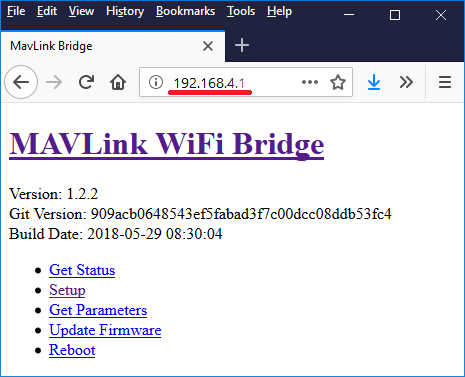
  • connect from your PC to the wifi access point (initial access point ID is “ArduPilot”, and password is “ardupilot”)
  • open a browser to 192.168.4.1 and a simple web interface will appear like below
  • click on the “Setup” link
  • set the “AP SSID” and “AP Password” fields (both must between 8 and 16 characters), push the “Save” button and reboot the device
    ../_images/esp8266-telemetry-web-setup.png

Thanks to Ray’s blog which was the source for some of this page’s advice

++++++++++++++++++++++End tutorial+++++++++++++++++


Here is the details to set up:

Thingstream>StarlinkRouter>HeffLink wifi>>>>>ESP8266>TelemPort1>UDP,57600>Pixhawk4>Ardupilot>NTRIP> ____user:pass@host:port/mountpoint______>Telem2 Port>ArduSimple F9P


NTrip string is now: FairviewRover:FairviewRover#1@pp.services.u-blox.com:8883/51705a15-somedigits-0eb011b4e410

This is the connection to Thingstream

We need to turn off the original GPS module.

F9P FW VER 1.13

On a pixhawk 2.4.8 connected to telemetry port 2, the parameter SERIAL2_PROTOCOL must be set to “2”

Did you try the FTDI drivers?
https://www.ftdichip.com/Drivers/VCP.htm


serial port with power

Hi power64,
Let’s see if we can help you implement what you have in mind. Some clarification:
– The Pixhaek JST-GH connector is following the Pixhawk standard:
* 1: 5V_IN (So you can find it 100% sure, pin 1 is the one connected to C9 on the PCB).
* 2: ZED-F9P UART1 RX (3.3V level)
* 3: ZED-F9P UART1 TX (3.3V level)
* 4,5: Not connected
* 6: GND
– As mentioned above it’s connected to UART1 of ZED-F9P. So you can use it at the same time as the XBEE.
– 5V Input, this connector doesn’t have 5V Output.
– 3.3V RX/TX. RX/TX are not 5V tolerant.


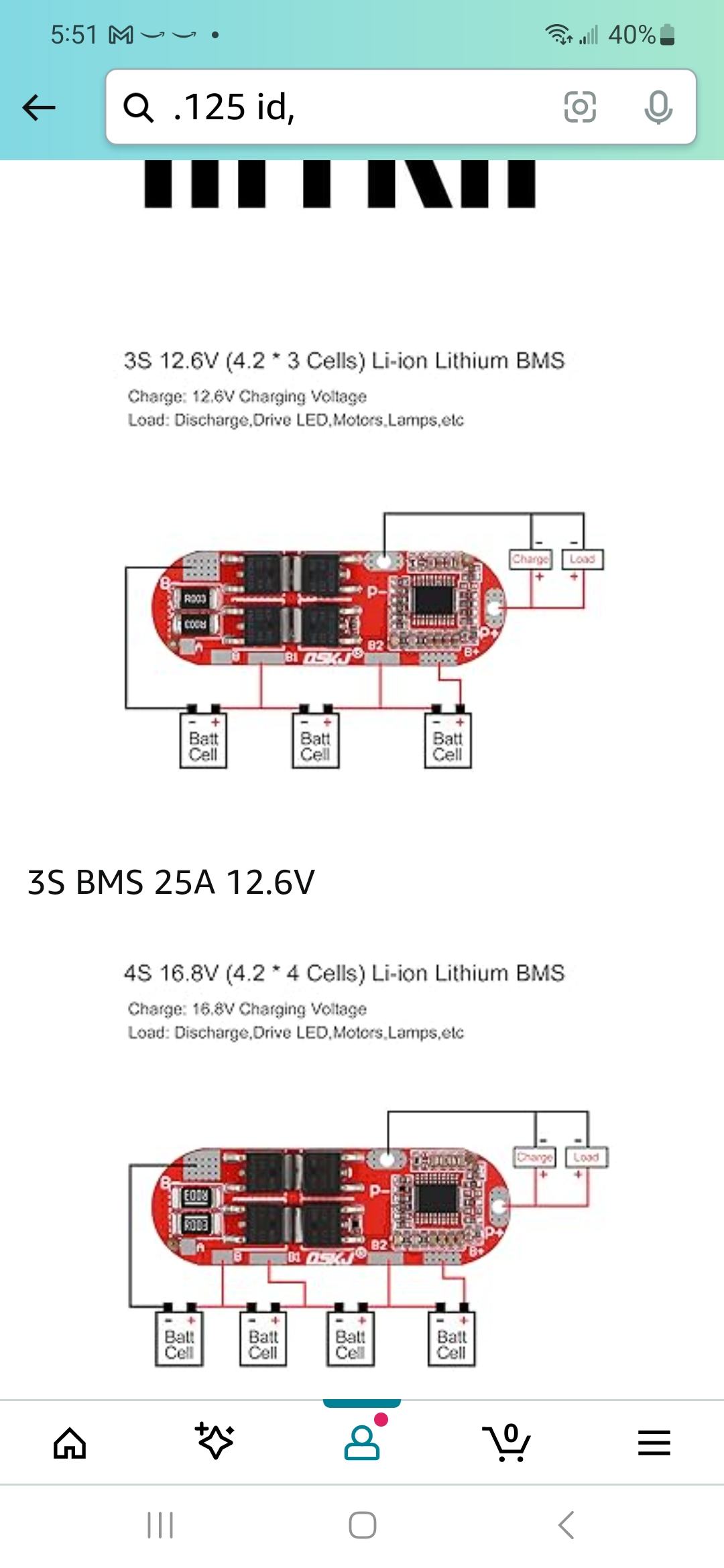
Lipo BMS