Tag GEneva
Tag Farnboro
Frank Maignier
Tierry Bove
Max Zeno mzeno@tagaviation.ch
lburnier@Tagaviation.ch
Tag GEneva
Tag Farnboro
Frank Maignier
Tierry Bove
Max Zeno mzeno@tagaviation.ch
lburnier@Tagaviation.ch
Jaques, Ricco Antoniostarlink-study-material
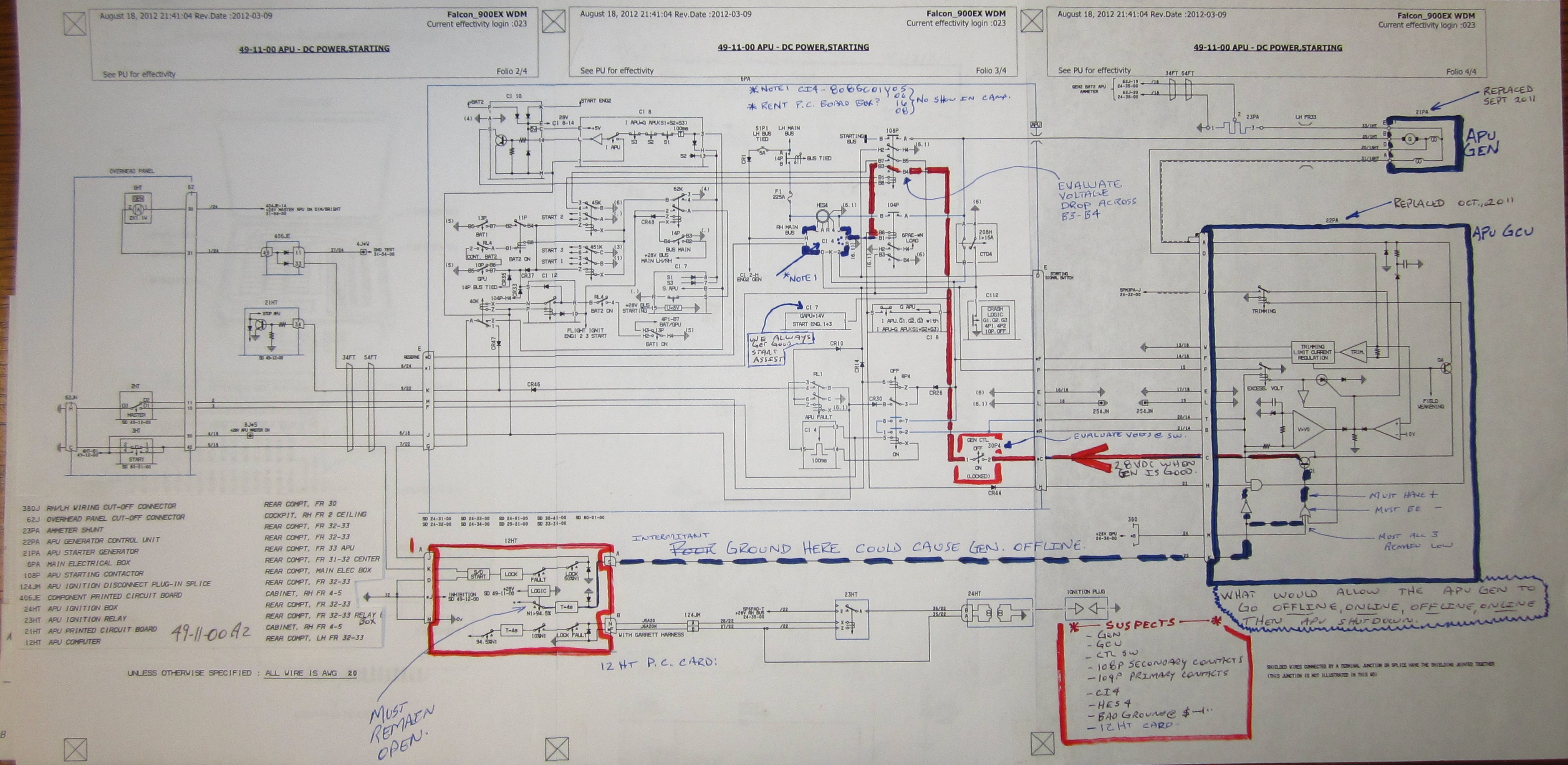

After installation of loaner batteries:
This time…. Marty departing Morristown, the apu gen came online.
After APU start, APU amps pegged on hard charge. normal.
a few seconds later, the needle came down into the green range as expected.
then the APU gen went offline, then online…..APU still running fine.
during the next few moments, the same thing happened several times.
then the APU Gen went offline and the APU shut down.
Marty attempted a #2 engine start, and the batteries were too weak to start the engine.
Next day, Batteries worked fine, Number 2 engine startfine, then:
APU started fine W/ #2 engine running. then buss volts continued to decrease through 23 and below.
Then APU shutdown. Then buss volts normal.
Jody had a good idea that a very bad starter might be hitting the batteries too hard and dragging them down.
APU starter gen put in this AC for this same problem Sept. 2011, so I don’t think that is it.
October 2011, there was a APU GCU installed after “Regulating” problems.
What about the HESS. maybe a CI4
Herre is what Cats has to say:


http://itswapshop.com/
You will need to login with this URL with Firefox:
Remove upper left Logo and install the ATS logo? According to : http://www.zen-cart.com/content.php?163
By default Zen Cart uses logo.gif for the name of this image, but you can use you own filename for the logo.
Using an image editor, create your new logo and save it to
includes/templates/CUSTOM/images/ATS_LP_LogoSmall.png .
After creating your logo you can adjust the height, width and logo name in includes/languages/ENGLISH/header.php
define(‘HEADER_ALT_TEXT’, ‘ATS Zen Cart‘);
define(‘HEADER_LOGO_WIDTH’, ‘150px‘);
define(‘HEADER_LOGO_HEIGHT’, ‘150px‘);
define(‘HEADER_LOGO_IMAGE’, ‘ATS_LP_LogoSmall.pngf‘);
Make the needed changes reflecting the name of your site, and the width, height and filename of your logo.
**** I had to put it back in : /languages/ENGLISH/CUSTOM/header.php *********
save the file to includes/languages/ENGLISH/CUSTOM/header.php and upload it to your server.
By default, the logo is left aligned. Changing the alignment involves making a modification to yourincludes/templates/CUSTOM/css/stylesheet.css. Open the file and find the following:
#logo, .centerBoxContents, .specialsListBoxContents, .categoryListBoxContents, .centerBoxContentsAlsoPurch, .attribImg {float: left;}
Since this is a collection of several “selectors” (#logo, .centerBoxContents, etc) and in order not to interfere with the layout of other sections, split this into two separate statements and create a new selector/definition below it, like this:
.centerBoxContents, .specialsListBoxContents, .categoryListBoxContents, .centerBoxContentsAlsoPurch, .attribImg {float: left;}
#logo {float: left;}
To center the logo use text-align: center; or to align it to the right use float: right;
Make the needed changes, save the file to includes/templates/CUSTOM/css/stylesheet.css and upload to your server.>>
sudo apt-get update
sudo apt-get install gnome-shell
<snip>
Worked first time
When looking for datasheets in Google, I find it helpful to type the part number I’m searching for, the word datasheet, then “filetype:pdf” so that it will ONLY return direct links to pdf’s.
Thanks DEAKS
b-44/100
newark
American NAARMO
http://www.faa.gov/air_traffic/separation_standards/naarmo/rvsm_approvals/
EASA
You need the name of the “Oprerator of the aircraft
http://www.ecacnav.com/content.asp?PageID=66
Excellent critisism of leaning basic science on video.